Showing posts with label Games. Show all posts

Wednesday, August 25, 2010

Playstation 1 Emulator PC Setup

,
Before we install Playstation one in your PC, here are the hardware specification for you to review. If your PC hardware pass the requirement then you can start the installation instruction.

PS1 Specification:

    * Analog Joystick
    * Controller
    * Memory Card
    * Link Cable
    * Mouse with Pad
    * RFU Adaptor
    * Multitap Unit
    * R3000A
    * 32 bit RISC processor
    * Clock- 33.8688MHz
    * Operating performance - 30 MIPS
    * Instruction Cache - 4 KB
    * Data Cache - 1 KB
    * BUS - 132 MB/sec.
    * Data Transfer Rate (DMA TO RAM) 150 KB/sec. (Normal) 300 KB/sec. (Double speed)
    * Maximum Capacity - 660 Megabytes
    * Features Audio CD play XA Interactive Audio
    * Control Pad Two control pad connectors Expandable with multitap connector
    * Backup
      RAM Two removable cards 128 KB Flash Memory OS support for File Save, Retrieve and Remove
    * Serial Port I/O Link Cable Connectivity
    * Main RAM: 2 Megabytes Video RAM: 1 Megabyte Sound RAM: 512 Kilobytes CD ROM buffer: 32    Kilobytes OS ROM: 512 Kilobytes
    * 24 Channels
    * 44.1KHz sample rate
    * PCM audio source
    * Digital effects include: Envelope Looping Digital Reverb
    * Load up to 512K of sampled waveforms Supports MIDI Instruments

Play station one can also run this minimum PC Specification: RAM 1G, 1.6 Ghz Processor, 64Mb Video Card.

Installation Instruction:

1. Download the PS1 Emulator here. Download only the ePSXe 1.7.0.
2. After you download, extract the file using winrar. If you don't have winrar, you can download it for free. Just search it on Google.
3. After extracting, go to the folder where ePSXe.exe is installed. Open the bios folder and download the "SCPH1001.bin" and place it on the bios folder.
4. Go to the Plugin folder and download plugin files here. Extract the files inside the Plugin folder. It contains sound plugin, graphics plugin, and etc.

PS1 Configuration:

Video Configuration:

After you do all the stuff in the installation instruction, open ePSXe.exe and on the menu bar select config > select video > and on the "Select/Config Main Video Plugin" choose the "Pete's DX6 3D3 Drive 1.77". See the image below:
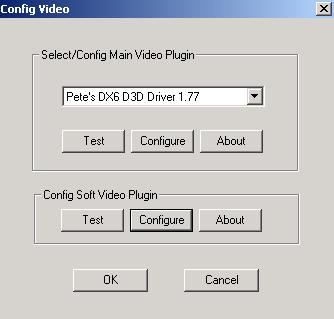

Click the Configuration on the Config Soft Video Plugin and follow the configuration below:


You can adjust the Fullscreen Mode, Window Mode, and Color Depth depending on your video card. As for my PC with 64mb built-in video card, I go for this configuration. So click OK and OK.

Sound Configuration:

Select the Config again in the menu bar and select Sound. On the "Select Sound Plugin" choose "P.E.Op.S DSound Audion Drive 1.9", check the Sound enabled, and click OK. See the image below:


CDROM Configuration:

On the CDROM configuration under config on the menu bar Cdrom just select "Mooby 2 cd disk image drive 2.8".

Bios Configuration:

Go to Config > Bios > Click Select Button > Go to the folder where you install the ePSXe.exe > open the bios folder > and select the SCPH1001.ini > Click open > click Ok

So I think that would be all. Have fun playing PS1 Games, just post a comment if you have some concerns or questions.
Read more

Tuesday, August 10, 2010

How to Earn Money from Online Games?

,
I am an online gamer for almost 6 years now and I have played lots of online games like Cabal, Rohan, RF, Hero Online, Flyff, Rose Online, Weapon of War, World of Warcraft, Dekaron, Tantra, and many more both private and non-private servers.

Based on my experience as online gamer, making money from online games is quite difficult. Why? It needs time, effort, patience, and sometimes you have to spend money.

In this business, there are four ways to earn real money:

1. Rare Items - These are the items which are very hard to find. Most of the items are Boss Drop so it needs time, effort, and patience because out of ten (10), only one (1) or two (2) bosses are able to drop rare items in random. Rare items also cost large amount of game money that is why other players buy these items using real money for their characters.

2. Very nice item attribute for both armors, weapons, and other equipments - These can either be rare, unique, elite, or normal equipments. This is the most important thing to consider if you sell items. The higher the item attributes, the higher the price. It also depends on what type of item you have, take a look on the image below:


The items you see is a Unique Katar type Weapon from Rohan online game. It is an agility type weapon and as you can see this is one good example of a nice attribute agility type weapon. Why? It gives additional damage, hp (health points), defense, attack rate and defense rate, and most of all critical damage. This weapon can only be obtain through fishing or merging two rare weapons which again requires time, effort, patience, and money.

3. Nice Character Build-up -  There are players who prefer to buy high level characters with good build-up in terms of skills and specialty (dex type, str type, int type) rather than leveling their own character.

4. Large amount of Game Money - This is the most common trade in the world of online games depending on the drop rate. If the drop rate is high, the trade (Game Money to Real Money) becomes cheaper. If you really want to earn money from playing online games, always play non-private servers since non-private server online games has better population compare to private servers. The higher the population the higher the chance you get a buyer. Remember, high population mean "tough competition", the tougher the competition the price becomes higher.
Read more

Thursday, July 29, 2010

RPG Maker XP Warcraft Scourge WindowSkin

,
Hello again, I am here to show you another cool RPG Maker XP Theme and it is called Warcraft Scourge Theme.

What I really like about the theme is the details, style, and color which is different from the common themes. This theme is perfect for any horror games and games which you think this theme will fit.

This theme is another original masterpiece of mine so again, I hope you like the theme I am showing you now and have fun with it. And for those who plan to use this theme for their project, all I need is site or name credit.

And if you have some questions or comments to write about this project, just don't hesitate to comment here because I really need it for some improvement or good changes.

Game Environment Preview:

Title Screen:

Menu System:

Battle System:


Download this theme:


Read more

Wednesday, July 21, 2010

RPG Maker XP Game Development Theme | Warcraft Frozen Throne Theme

,
Hello to all, this is Neil Anthony, I am an RPG Maker fan, I am using RPG Maker XP for about 2 years now and it is really fun creating games using this game development software.

In this topic, I would like to show you a new RPG Maker XP theme which is similar from the game Warcraft the Frozen Throne. The theme is really cool because it really makes the RPG Maker XP games more like Warcraft.

This is one of my original RPG Maker XP theme masterpiece, so I hope you like it.

For those who are planning to use this theme, all I need is site credit or name credit. If ever you see problems on this project, feel free to e-mail me.

Game Environment Preview:

Title Screen:


Menu System:


Battle System:


Download this theme:


To download this theme, just right click the image and click "Save Image As".
Read more

Thursday, January 14, 2010

Game Development Software

,
Games has taken the internet by storm, lots of people get addicted on games like facebook and other game sites. People learn to love playing games because of its ability to entertain. Games has no age limit whether you are a child, teenager, or an adult so this is good for online business. Based on google keywords result, there are 277,000,000 people around the world who search about games. See Image below:


So if you are planning to create your own games and do some game business online, here are the list of game development software you can use.


4. 3D Game Maker


5. FPS Creator X10

 See also FPS Creator (older version)

6.Dark Basic

 See also DarkBasic Professional (new version)

7. Dark Game Studio


8. RPG Maker XP


9. RPG Maker VX


Read more

Friday, December 18, 2009

How to solve "Failed to Obtain a Trial Serial Number from the nTitle Server" without internet connection

,
Follow the instruction carefully so it will not harm your computer. Editing the registry is dangerous. So let's start:

1. Open a notepad.

2. Copy this code in the notepad.

For RPG Maker XP:

Windows Registry Editor Version 5.00

[HKEY_CURRENT_USER\Software\Protexis]

[HKEY_CURRENT_USER\Software\Protexis\Licenses]

[HKEY_CURRENT_USER\Software\Protexis\Licenses\438839465]

[HKEY_CURRENT_USER\Software\Protexis\Licenses\438839465\Trial]
"State"=hex:d6,f1,cf,6f,8e,d8,1d,d8,23,ff,93,ee,a5,5e,d8,84,4f,cb,c3,06,c4,d9,\
86,73,3d,dd,9a,a1,a3

[HKEY_LOCAL_MACHINE\SOFTWARE\Protexis]

[HKEY_LOCAL_MACHINE\SOFTWARE\Protexis\Licenses]

[HKEY_LOCAL_MACHINE\SOFTWARE\Protexis\Licenses\438839465]
"Ffg8YQgm49nQGBOS"="HKkFTV4H9P3zI0/ZUBSSWJar6s8"
"ReleaseCode"="309396A1D2D79E0FE2A7"
"Version"="1.3.7"
"Verification"=hex:98,ec,72,c9,e0,a3,99,4a,b7,2a,17,fb,ca,55,f9,08,c8,38,58,0a,\
e9,ec,a5,6b,0e,a7,9f,57,f1,00,fd,5c,1e,76,bb,9a,eb,88,a8,a1,5f,7d,ad,67,57,\
97,a4,55,e5,38,13,f6

[HKEY_LOCAL_MACHINE\SOFTWARE\Protexis\Licenses\438839465\Trial]
"Terms"=hex:d6,f1,cf,6f,8e,d8,1d,d8,3d,ff,ac,ef,9e,61,d8,84,4f,46,e4,06,ff,e6,\
86,73,3d,dd,9a,a1,29


For RPG Maker VX:

Windows Registry Editor Version 5.00

[HKEY_CURRENT_USER\Software\Protexis]

[HKEY_CURRENT_USER\Software\Protexis\Licenses]

[HKEY_CURRENT_USER\Software\Protexis\Licenses\438848462]

[HKEY_CURRENT_USER\Software\Protexis\Licenses\438848462\Trial]
"State"=hex:f2,b5,66,bf,da,9b,42,53,6e,0b,55,cc,ab,02,83,ef,2c,a5,38,eb,ec,42,\
23,31,b9,35,d0,d5,13

[HKEY_LOCAL_MACHINE\SOFTWARE\Protexis]

[HKEY_LOCAL_MACHINE\SOFTWARE\Protexis\Licenses]

[HKEY_LOCAL_MACHINE\SOFTWARE\Protexis\Licenses\438848462]
"LpxXU/2AvhBzjA+V"="SLR/aMreuFxa2F2++aYViVgofQY"
"ReleaseCode"="F440E556A6B776EBD961"
"Version"="1.3.9"
"Verification"=hex:12,24,d8,df,26,90,25,4f,b6,23,e3,85,a8,6d,8d,d5,cf,31,2a,df,\
5e,79,d1,53,ad,60,1c,e8,d0,5c,e3,6a,a3,90,41,11,41,92,96,8b,68,d9,93,fe,13,\
d9,a0,b9,28,35,17,1b

[HKEY_LOCAL_MACHINE\SOFTWARE\Protexis\Licenses\438848462\Trial]
"Terms"=hex:f4,b5,66,bf,da,9b,42,53,70,0b,55,cc,84,43,83,ef,d2,29,1f,eb,c3,03,\
23,31,b9,35,d0,d5,5e


3. Save the file as "Protexis.reg"

4. Close the notepad and Double click the "Protexis.reg" file you have created.

5. A pop up message will appear. Just click "Yes" and "Yes".

After adding the Protexis in the registry open the RPG Maker XP or RPG Maker VX, the "Failed to Obtain a Trial Serial Number from the nTitle Server" should not appear instead you will see registration or the activation choices.


Read more
 

Topic Central Copyright © 2011 -- Template created by O Pregador -- Powered by Blogger